Tuesday, May 28, 2013

Setup your own PPTP VPN server for Android


A. PPTP VPN server setup


1. Install the VPN server

#> apt-get install pptpd


2. Assign IP address for VPN client
#> vi /etc/pptpd.conf

localip 10.0.0.1
remoteip 10.0.0.100-200


3. Create VPN User &Password
#> vi /etc/ppp/chap-secrets

# client        server  secret                  IP addresses
user1 pptpd password1 *
user2 pptpd password2 *


4. Define DNS for VPN client
#> vi /etc/ppp/pptpd-options

ms-dns 8.8.8.8
ms-dns 8.8.4.4


5. PPTP setup completed, Restart the service.
#> service pptpd restart


6. Enable IP Forwarding, and apply changes.
#> vi /etc/sysctl.conf

net.ipv4.ip_forward = 1

#> sysctl -p


7. Create NAT for iptables (most important!!!)
#> iptables -t nat -A POSTROUTING -o eth0 -j MASQUERADE && iptables-save


8. Optional, enable communication between VPN clients
#> iptables --table nat --append POSTROUTING --out-interface ppp0 -j MASQUERADE
#> iptables -I INPUT -s 10.0.0.0/8 -i ppp0 -j ACCEPT
#> iptables --append FORWARD --in-interface eth0 -j ACCEPT


  • Steps above assume you have basic Linux Knowledge
  • Steps are based on Ubuntu 11.04
  • PPTP log was in "/var/log/syslog".
  • use "last |grep ppp" to show users logged in

B. Android VPN setup


1. In Android, go to "Setting" > "More" > "VPN", and type in Info as below.


2. Click on the connection your just created and type in username & password as defined in A.3.


3. After successful login, you will see a Key icon in Notification bar, plus a "VPN Activiated" message.


Ref : https://www.digitalocean.com/community/articles/how-to-setup-your-own-vpn-with-pptp


Friday, May 10, 2013

Subscribe Facebook / Facebook Page by RSS Feed

1. Prepare you Facebook page URL
i.e. (https://www.facebook.com/3thdev)

2. Get Facebook ID

Visit the page http://findmyfacebookid.com/ . It will translate your Facebook URL into Facebook ID
3. Prepare the RSS URL
Append your desired Facebook ID into the following link

http://www.facebook.com/feeds/page.php?format=atom10&id=<FACEBOOK-ID>
http://www.facebook.com/feeds/page.php?format=rss20&id=<FACEBOOK-ID>

4. Subscribe your Feed
Use you link to subscribe the feed from your favored RSS Reader. If you don't have one, try these.
http://www.feedly.com
https://play.google.com/store/apps/details?id=com.noinnion.android.greader.reader

Monday, April 01, 2013

Setup MySQL & PHP in Ubuntu

Setup MySQL & PHP in Ubuntu

Please make sure if your Apache & PHP was properly installed

Install the following packages.
apt-get install mysql-server
apt-get install libapache2-mod-auth-mysql
apt-get install php5-mysql

Restart Apache afterwards.
 

/etc/init.d/apache2 restart


Edit the MySQL config file, and make change as below. This example assumed you take IP as below.have
Apache/PHP/MySQL Server IP = 192.168.11.57
Workstation IP = 192.168.11.4

vi /etc/mysql/my.cnf

#bind-address           = 127.0.0.1
bind-address            = 192.168.11.57


Creat a Database & Grant privileges for user access. MySQL default password is blank.

$ mysql -u root -p
Enter password:
mysql> CREATE DATABASE mydb;

mysql> use mydb;

mysql> CREATE TABLE PHONES(
pid int(11) primary key auto_increment,
name varchar(100) not null,
price decimal(10,2) not null,
description text,
created_at timestamp default now(),
updated_at timestamp
);

mysql> use mysql

mysql> GRANT ALL ON *.* to root@'192.168.11.4' IDENTIFIED BY 'your-root-password';
mysql> GRANT ALL ON *.* to root@'192.168.11.57' IDENTIFIED BY 'your-root-password';

mysql> FLUSH PRIVILEGES;


Update MySQL user password

 
# mysqladmin -u root -p'your-old-password' password 'your-old-password''


Saturday, March 30, 2013

a Really Simple Android ListView Example

http://windrealm.org/tutorials/android/android-listview.php

Tuesday, March 26, 2013

Check if Apache & PHP was properly installed on Ubuntu Linux

Once your have installed Ubuntu server, depends on your setup option, Apache & PHP may not be installed. You can then issue the following command to install then.

sudo apt-get install apache2 

sudo apt-get install php5 

sudo apt-get install libapache2-mod-php5 

sudo /etc/init.d/apache2 restart 

Afterwards, issue vi a php file (phpinfo.php) in dir /var/www , with content below

<?php

print_r (phpinfo());

?>

If a PHP verion page showup, it means you Apache & PHP setup is completed.


Friday, October 26, 2012

Creating Android Icon


 Finding a tools to create an icon for your Android apps? Check this out.


Greenfish Icon Editor Pro Portable

 http://portableapps.com/apps/graphics_pictures/greenfish-icon-editor-pro-portable

Friday, October 12, 2012

Android 4.1.2 factory image new available for download


Android 4.1.2 stock ROMs for various Nexus device are now available for download.

Supported device list is as below:

- Nexus 7
- Nexus Q
- Galaxy Nexus
- Nexus S


https://developers.google.com/android/nexus/images

Thursday, August 16, 2012

Android version vs API Level

As new version of API released, you can bring more feature to your own apps.
However, those apps written by new API Level will not be assessable by old of Android version. Developer then get to make your own choice,

more new feature ? or more potential user?


Platform VersionAPI LevelVERSION_CODENotes
Android 4.1, 4.1.1 16 JELLY_BEAN Platform Highlights
Android 4.0.3, 4.0.4 15 ICE_CREAM_SANDWICH_MR1 Platform Highlights
Android 4.0, 4.0.1, 4.0.2 14 ICE_CREAM_SANDWICH
Android 3.2 13 HONEYCOMB_MR2
Android 3.1.x 12 HONEYCOMB_MR1 Platform Highlights
Android 3.0.x 11 HONEYCOMB Platform Highlights
Android 2.3.4
Android 2.3.3
10 GINGERBREAD_MR1 Platform Highlights
Android 2.3.2
Android 2.3.1
Android 2.3
9 GINGERBREAD
Android 2.2.x 8 FROYO Platform Highlights
Android 2.1.x 7 ECLAIR_MR1 Platform Highlights
Android 2.0.1 6 ECLAIR_0_1
Android 2.0 5 ECLAIR
Android 1.6 4 DONUT Platform Highlights
Android 1.5 3 CUPCAKE Platform Highlights
Android 1.1 2 BASE_1_1
Android 1.0 1 BASE

As of  Aug 2012 with "Health and Fitness" apps, majority (58%) Android version is still in 2.3.3. Latest version 4.0.3 just get ~18. % share.


So, you get the answer


http://developer.android.com/guide/topics/manifest/uses-sdk-element.html#uses

Monday, August 13, 2012

海豹雜記: StockWatcher -- Google Web Toolkit(GWT) 入門 (三)

海豹雜記: StockWatcher -- Google Web Toolkit(GWT) 入門 (三): 在 StockWatcher -- Google Web Toolkit(GWT) 入門 (二) 中已經將所有的使用者介面元件建立好了,接下來要建立元件的 event,讓這些原件可以有一些動作。 處理客戶端的 Event 加入 Event Handler 在 GWT...

Saturday, August 11, 2012

send SMS to Android Emulator


If you try to develop SMS related Android app, you may want to send testing SMS to your emulator through Emulator Console.

With Emulator Console, you can simulate voice call and SMS activity on your Android Virtual Device (AVD). To make it works, please following the following steps


1. Make sure your AVD was started.

2. Start putty. (Get here if don't have.)

3. Connect your local host with TCP port 5554. Press "Save" and "Open" to start Emulator Console.


4. if all things go fine, Emulator Console will display as follow.


5.  Type in "sms send <phone number> <message text>".


6. SMS message will be delivered ti AVD.


Tuesday, August 07, 2012

Google Play : Android Developer Console beta problem

Google had released a new beta version of Google play Android Developer console..
However, I get a problem when in providing multiple language description on my apps.

I defined 4 language description (English-US, English-EN, Trad Chinese & Simp. Chinese). It looks fine in new beta.
But when I switch back to old version. the language tag just show Eng-en x 3 & 1 x Trad Chinese.

I have reported the issue to Google, and see if they have any reply.

Friday, August 03, 2012

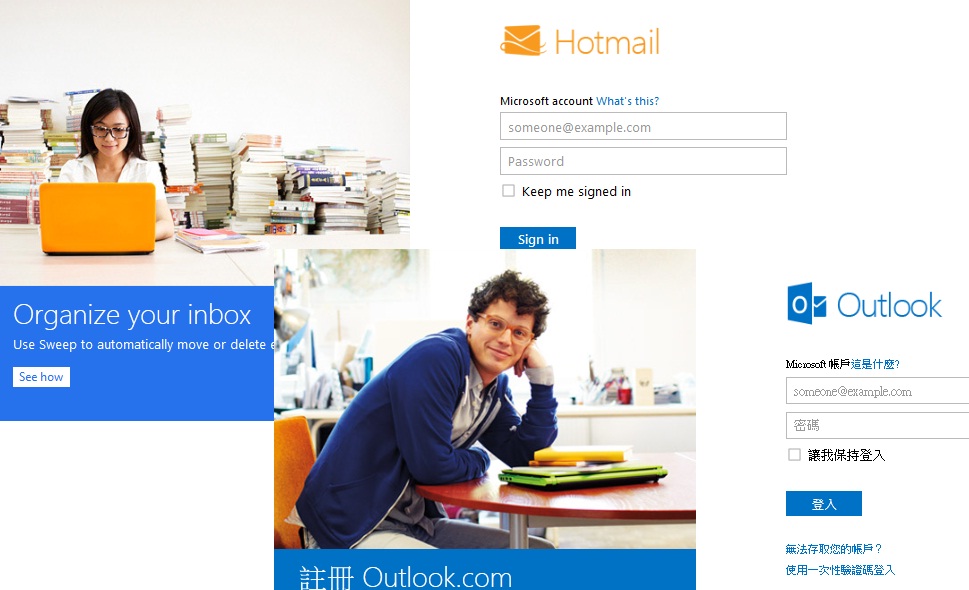
Outlook.com registration started


Outoolk.com registration has been started. get your won name, before it was taken by the others!  UI is much more clean, with limited Ads, then Hotmail, cool.

If you have a Mobile Device including Windows /Mobile / iPhone / Android, you may also download it official apps too.

Microsoft has NOT announced if existing Hotmail.com will get any changes, but the log-on it screen has gone into the Metro way, just like Outlook.com. I just worried how long will Microsoft keep it Totmail.com operation


Thursday, August 02, 2012

making table on Blogger / BlogSpot

If  you have table prepared on Excel and wanted to paste it on Blogger, table layout will be destroyed.
Its because Excel table incuded large amount of specific layout including actual pixel size, position, etc.

To make the layout in order, switch to "HTML" immediately right after you you pasted the Excel table in "Compose", and clear up all unwanted tag

 Her it get a nice HTML basic example for you, from another Blogger.

http://tips-for-new-bloggers.blogspot.hk/2007/08/tables-html-basics-and-tutorial.html

Error when implementing AdMob into existing Android app


After a successful application of AdMob, next step to start your Ads business is integrate the AbMob into your apps. I am not going through the detail as, its really simple for person who can write your own apps.

I just want to share some experience during the implementation,  especially when your existing apps are developed based on Android 2.3 or prior version.

if you following the guideline from Google AdMob, you may get the following error

<activity android:name="com.google.ads.AdActivity"
              android:configChanges="keyboard|keyboardHidden|orientation|screenLayout|uiMode|screenSize|smallestScreenSize"></activity>


error: Error: String types not allowed (at 'configChanges' with value 'keyboard|keyboardHidden|orientation|screenLayout|uiMode|screenSize|smallestScreenSize').


When your are using AdMob V6+, you apps SDK must be Android 3.2 (target SDK 13) or above. For new I recommend you to use Android SDK 4.0.3 (SDK 15), as Android 3.2 was for Tablet.

1. In AndroidManifest.xml, make the changed as below. remeber to setup your minSdkVersion, or your existing coding may not be run.


    <uses-sdk
        android:minSdkVersion="10"
        android:targetSdkVersion="15"/>

 2. Make the following changes in "project.properties" file


# Project target.
target=android-15


Please note after the implementation. you lay out will have become Android 4.0 stylus. UI appearance may be changed.


Ads on your apps, AdSense vs AdMob vs AdWord


Google has several brands of advertising product, with different type of target audience.


AdWord

It's target for bsuiness who want to be place advertisement and be exposure on the Internet.
They pay for Gogole and let their Ads be show up on the relative site. As a developer, its not my job, but my "Boss" job.


AdSense

 If you own a web site / forum / blog and want to get some money, AdSense would be your choice. With large advertiser based, it provided localized advertisement network, in which the Ad it show on your site will could match the taste of your daily visitors.

However, a unapproved AdSense, I can tell you that its not easy to get a register AdSense in these years. First your content provided should be "clear". Any immortal content on your site, or misbehavior that affected your Ads click rate will probably lead your account disabled. AdSense application is not easy to get approved.

With the content of this Blog provided today (~ 20 post), Google AdSense defined it as "insufficient content" and will simply reject my application. As a developer, its also not the things for me. It takes large amount of time and effort to maintenance a webpage / Blog / forum with quality content, but what I am focusing is my Mobile Apps.


AdMob

If you have developed a android apps and published to Google Play, like me, and wanted share your products with Ads, it would be much easier to apply (vs AdSense). If you have a published apps on Google Play, can get your AdMob A/C on the fly once your  application submitted. Google also provided a tidy library JAR and allow you to implement your the Ads to your apps easily.


Conclusion

IF you have a apps on Google play and want to get some cash, Apply AdMob now, and start your Ads business.


Account who should apply? Cash flow What you need?
AdSense Web site owner / Blogger get paid An operational website / Blog
AdMob Mobile App Developer get paid An apps published on Google Play (or Apps Store)
AdWord Marketing people Pay Cash


Tuesday, July 31, 2012

"unable to resolve target" and "Unable to get system library for the project"

Have you even tried to import an Android Project into Eclipse, but get error like "unable to resolve target" and "Unable to get system library for the project" ? If so, this post may help.


 In sometimes, the error was caused by unavailable of certain Android SDK version. The project may be build based on a version of Android SDK, that your Eclipse had not installed.

To solve the issue, just following the steps below.

1. In Eclipse, right click your project > Properties.
2. Click Android, select a build target and "ok"
3, When you go back to Eclipse, clokc, Project > Clean > Clean all projects

Then back to your .java and all error should be removed.

p.s. The nice example was came from How to convert an Activity class to use with FragmentPagerAdapter

Report for Apple apps naming


Its always be a hard decision in naming my own apps. For me, I get to consider a few issues.

1. Descriptive - User get to know what you apps is through the name

2. Unique - Make your apps different from other

3. Simple - Easy to remember, so that it can be told to others!

For sure that I am not very well in apps naming.


How would you name your apps? See if you can be inspired by those Apple IOS developer.

Most commonly used wording in IOS apps name:
1. HD – 27777
2. Lite – 21690
3. Free – 18511
4. iPad – 11313
5. Pro – 9024
6. Guide – 8361
7. Mobile – 7695
8. App – 6142
9. iPhone – 5441
10. Game – 5377
11. Travel – 4851
12. Radio – 4633
13. World – 4504
14. Map – 4351
15. Dictionary – 4220
16. Edition – 4198
17. Calculator – 4164
18. Kids – 3852
19. English – 3680
20. News – 3611
21. Book – 3254
22. Magazine – 3009
23. Photo – 2957
24. Puzzle – 2835
25. Music – 2764


Which words do App developers most commonly use in their App titles?
Apps Score Report June 2012

Monday, July 30, 2012

"R cannot be resolved" error

For "R cannot be resolved" error, in most cases, the problem may relied on the Java itself, but /res/values/strings.xml. Make sure the syntax of XML is correct.


Sunday, July 29, 2012

Baby milkfeed counter


It help parent to record the volume of milk their baby taken. It also tell you your baby age and birthday! And the most amazing thing is ... its my first Android apps!


Localized  in English, Chinese, Simp. Chinese, Trad. Chinese

You may download the apps Baby milkfeed counter from Google Play .

Upgrade and Versioning of your apps


If you have developed feature or bug fix your Android apps, you have to change the version of your app, before you can upload it to Google Play.

versionCode - Integer only. That's the version of your application code. You must change (normally +1) its or Google Play will not allow you upload the APK.

versionName - String. Version name that all users can see. So that they can identify which version they are using. (normally in format like 1.0.2)


See more in Android Developer - Versioning Your Applications